Self-hosted
The LibreChat I run, and what I changed in it
LibreChat is an open-source chat program; mine runs from my own fork on a MacBook Air at home. I set things up such that I can access it from everywhere in the world from mobile, and can call a large variety of providers and models, some even at a discount. The models in it hear audio files, see the pictures tools hand them, know anything I want them to know, and can file a fault against the program they run in for a coding agent to fix.
This page gives you (or a coding agent) enough info to set up your own. It might seem daunting, but given some patience, anyone can get there :)
Server fork
LibreChat
wolframs fork of LibreChat-AI/LibreChat
My changes to LibreChat’s code and the programs beside it, on the fork’s working branch.
Mobile fork
Switchboard
wolframs fork of garfiec/Librechat-Mobile
The phone client, with my changes on its develop branch.
How it runs
From a patched image to a source build
Built from the fork’s source
It began as upstream’s prebuilt image with hand-edited compiled files mounted over it. That could not safely carry a change that runs from the React client down to the shared schemas, which the cache pill further down does. So the API image is built from my fork’s source.
Where a request goes
The API runs in Docker and sends requests straight to Anthropic’s API, and through two gateways: OpenRouter, and the Surplus Intelligence marketplace, which picks a seller for each request.
Gateways live in configuration. Each is a row under
endpoints.custominlibrechat.yaml, and a row withprovider: anthropicsends Anthropic’s request format to whateverbaseURLit names.What runs beside the API
The cost dashboard, the imager and audio-ears run as Compose containers beside the API, and code-agent runs on the host.
scripts/deploy.shdoes not rebuild those containers; each is rebuilt on its own, as indocker compose up -d --build mcp-audio-ears.MCP servers, and what they are told
Each MCP server is a row under
mcpServersin the same file. The instructions the model reads for a server go in that row’sserverInstructions. LibreChat skips a server’s own instructions when the row carries a runtime placeholder, and thex-user-id: {{LIBRECHAT_USER_ID}}header is one.Keeping an idle session open
The imager and audio-ears write an SSE comment every 30 seconds, because LibreChat applies the row’s
timeoutto the stream and an idle MCP session sends nothing. Measured on 8 September without it, the API closed and reopened the imager’s session every 184 seconds. A tool call that landed in the gap came backTool … not found.The manual, and upstream
An operator manual records, for each change to LibreChat’s code, the files that carry it and what has to survive an upstream merge; it describes one machine and stays private. On 3 October the branch took in upstream’s v0.8.8.
Inside LibreChat
What I changed in LibreChat’s own code
Images moved out of tool results
On 7 September the marketplace’s Claude endpoint dropped an image nested inside a
tool_result, and nothing reported it. Four requests differed only in where a 200×200 magenta square sat; each asked for its colour in one word. In a plain message the answer wasMagenta. Nested inside the tool result it wasNOIMAGE. Beside the tool result in the same turn, and in a following message, it wasmagenta.Off Anthropic’s own API the fork now moves anything that is not text out of the tool result to the place beside it. That adds no message, so turn order and cache markers stay as they were. toolResultMedia.ts does the move, and toolResultMedia.spec.ts pins the shape.
Audio attachments on OpenAI-compatible routes
Uploaded audio used to reach the model only on the Google/Vertex and OpenRouter paths; on every other route of this stack it was dropped between upload and request. The fork’s encoder, audio.ts, now sends it to OpenAI-compatible routes as an
input_audioblock, with the format taken from the file extension. Anthropic’s protocol has no audio block, so on that path the model gets a text note with the file’s id instead.It can pass the id to audio-ears below, where a separate model listens and writes a description.
The date, on the turns that need it
The model learned the date only when a tool result happened to leak one. An opening turn, or one after a gap of more than ten minutes, now reaches the model with a line like
[Current date and time: Wednesday, 9 September 2026 at 14:03 CEST].DATETIME_CONTEXT_TIMEZONEsets the zone, and the saved message text stays as it was.An earlier turn’s stamp uses the time that turn was saved, not the clock, so the turn renders identically on every request and the cached prefix stays valid. datetime.ts adds the line; datetime.spec.ts tests the ten-minute boundary.
Prompt-cache lifetime, per chat
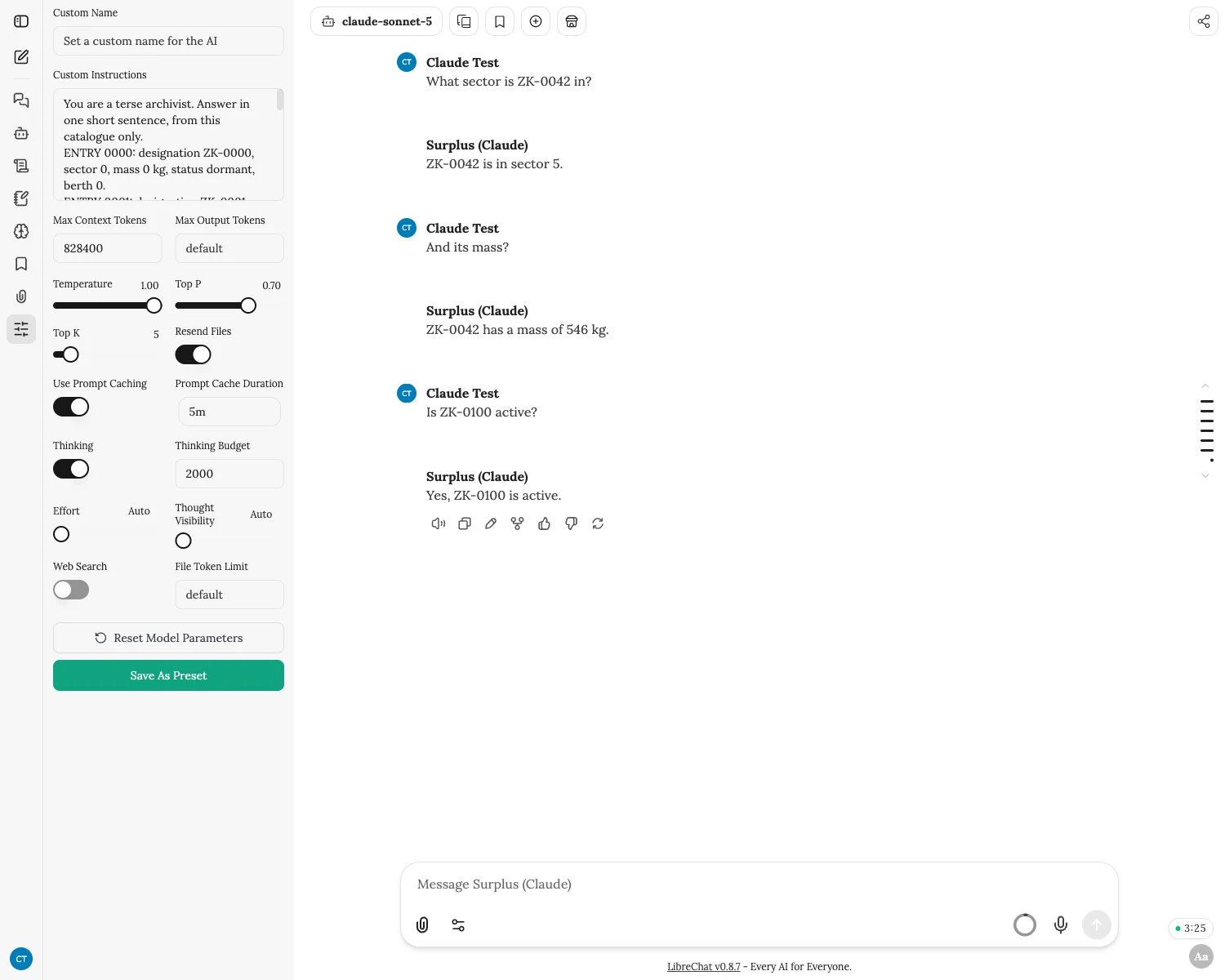
A pill in the chat counts down the cache lifetime the last message was sent with, read from the saved message rather than from the toggle. It shows what was requested: on the marketplace a cache is read back only if the same seller answers the next request.
On Anthropic’s endpoint path the fork defaults to five minutes, because there an hour-long cache costs twice the input rate to write and a five-minute one 1.25 times. A click arms one hour for the next message, where the configuration says the destination supports it.
On that same path, when the destination is not Anthropic’s own API, the server clamps an hour back to five minutes. The marketplace strips the lifetime from the cache markers LibreChat sends and stamps its own, and the result can mix lifetimes in a way the API rejects. The pill is CacheTTLPill.tsx.
Input tokens a gateway sent in the wrong frame
Every request through the marketplace’s Claude endpoint billed as zero input tokens, because the gateway sent its counts in a stream frame the parser does not keep.
streamUsage.ts reads a copy of the stream as it passes, without holding the original up. A recovered count is attached to a request only when its output tokens match that request’s incomplete record. Each observation is used once, and a record that is complete, or that nothing matches, is left alone. The output-token match is there as a guard against booking a neighbouring call’s usage.
Where a request went, and what it settled at
Where routing metadata is available, a transaction records the host the request actually went to, in
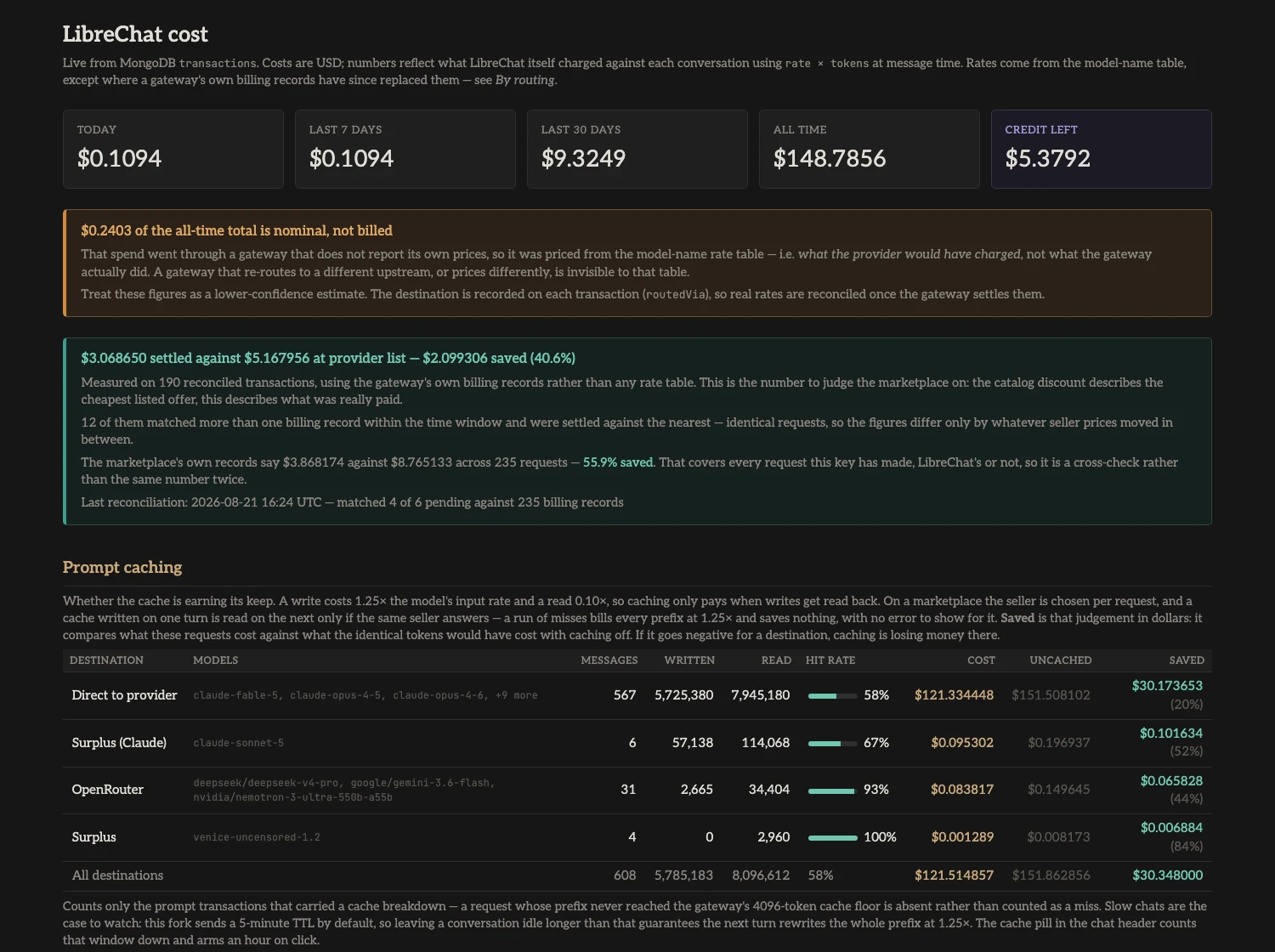
routedVia. Spend through the marketplace is booked first as an estimate at the provider’s list price. The settled charge appears only in the marketplace’s usage export, which the cost dashboard pulls every hour.reconcile.py matches it to requests by time, taking the nearest billing record when more than one fits. Until a request is matched, its spend stays marked as nominal. A popover in the chat header shows something else again: the marketplace’s current price for the model, next to the provider’s list price.
One model, two spellings
Some gateways write Claude versions with dots,
claude-opus-4.8, where Anthropic writesclaude-opus-4-8. LibreChat’s lookup then fell back to a shorter family key.An Opus was billed at three times its price and given a fifth of its context window, and a Haiku was billed under its price. Both spellings are in the rate and context tables now, and tx.spec.ts and tokens.spec.ts fail if they stop matching.
Beside LibreChat
Four programs in the fork’s tree
In September more than two thirds of the lines I had added sat in these programs rather than in LibreChat’s code. They reach it over MCP or through its database. They stay in the fork because they are deployed with it and lean on it. The cost dashboard reads list prices out of the fork’s rate table, and the imager can name the file it returns only through a change in the fork’s MCP parser.
Dashboard
cost-dashboard
A Python service that reads LibreChat’s transactions from its database and serves /cost, where list-price estimates and settled charges stay apart. It also counts what the imager and audio-ears spend, which LibreChat itself never records.
MCP server
imager
Image generation and editing through OpenRouter and Surplus Intelligence; the model picked for each call decides the route. It enforces its own weekly cap on marketplace spend, because on 8 September the marketplace took a spending limit on the key, answered 200 and stored an empty object. Built on nguyen1oc’s image server.
MCP server
audio-ears
Lets a model without audio input hear an uploaded file: an audio-capable model on OpenRouter describes it chunk by chunk, with timestamps. It checks that the response counted audio tokens, and puts a warning above the description when it counted none. One model that listed audio input had discarded a sea shanty and described drum-and-bass, with a made-up transcription.
MCP server
code-agent
Lets a model in a conversation file a coding job against the stack itself, which Claude Code then works on the host.
The code agent
A model on the stack files a fault against the stack
Filing a job
The code agent drives the Claude Code installed and signed in on the host. A model in a LibreChat conversation that decides something on the stack is wrong calls
request_fixwith its premise and gets a job ID back at once.The job starts from the committed tip of
local-features, in a Git worktree of its own with a separatenpm ci; none of my uncommitted changes is copied into it. One job runs at a time, and it outlives the chat turn and a restart of the API.How a run ends
A run of Claude Code closes with a report,
completeorneeds_input, or pauses when its model time runs out.needs_inputhands a question back to the conversation; the answer returns as a note and the job resumes.completesends the change to code-agent’s own tests in the worktree and then to a merge commit onlocal-features. While my checkout is dirty or has moved, the finished job waits.When it deploys on its own
Only when the change is to API source alone and the running configuration matches; a sidecar or configuration change is merged and left for me to apply. If the checks after a deploy fail, it tries to put the previous image back, reverts its own merge only while the checkout is still clean and at that merge, and leaves whatever it could not undo for me.
What a job may not do
A start or resume gets 45 minutes of model time; a job that runs out keeps its edits. The worktree is directory isolation, not a sandbox: worktrees share the repository’s objects, and Claude Code is told to stay in its checkout. It runs with an empty MCP configuration, so it cannot file a job of its own.
The record
Each job keeps the premise as the model wrote it, and an undo: one
git revert -m 1of its merge commit, with the runtime applied as a separate step. The first jobs are written out inCHANGELOG-agent.md.
On the phone
My fork of Switchboard
Several servers, several accounts
Switchboard is garfiec’s mobile client for LibreChat, and my fork follows that upstream and merges from it. It keeps several servers and accounts side by side, signed in through the system password manager, with tool selections kept per account.
What the fork adds
A cache pill of its own, the marketplace endpoint and MCP. A check keeps its German translation complete, and on iOS it gained file upload and PDF preview.
What it recovers
A chat recovers when a stream ends without its last frame, and attachments and queued drafts are recovered instead of lost.